

The ROG Ally X
The original ASUS ROG Ally was a loud, white, battery-drained mess. It had the right heart in the AMD Ryzen Z1 Extreme. It had a gorgeous 120Hz screen. But it also had a battery that died before you could finish a long commute. It had a RAM configuration that forced users into a constant tug-of-war between system stability and texture quality. It was a first-gen product in every sense of the word.
Now, we have the ROG Ally X. At roughly $999 USD, this isn’t a casual purchase. It is a premium flagship. ASUS isn’t targeting the budget-conscious gamer here. They are aiming for the hardware enthusiast. They want the person who spends hours in BIOS settings. They want the gamer who demands maximum specs in a handheld form factor.
This isn’t the Ally 2. The internal processing chip remains the same. Instead, this is a total re-engineering of the original chassis. ASUS looked at every major complaint from the first model. Then, they addressed them with surgical precision. But does “fixing the mistakes” justify a price tag that nears a high-end gaming laptop? Let’s find out.
Design and Ergonomics: The “Black” Factor
The first change is obvious. The Ally X is black. It looks more mature. It looks like a piece of high-end tech rather than a toy. But the color is the least important part of the redesign.
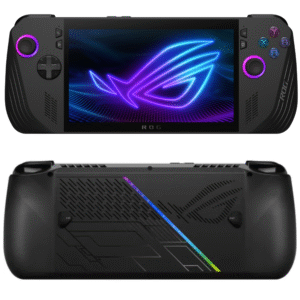
The chassis is slightly thicker. This was a necessary move. ASUS needed space for a massive new battery. This thickness actually helps the ergonomics. The original Ally was too thin. It didn’t have enough surface area for your palms. The Ally X features deeper, more rounded grips. It feels solid. It feels intentional. You can play for three hours without your pinky fingers going numb.
ASUS also fixed the back buttons. On the original model, they were massive. They were easy to hit by accident. Now, they are smaller. They are positioned exactly where your middle fingers naturally rest.
The biggest win for the DIY community is hidden inside. The Ally X now uses a standard M.2 2280 SSD slot. The original used the short 2230 drives. Those are hard to find. They are expensive. They cap out at lower capacities. By moving to the 2280 standard, ASUS has opened the door. You can now buy a cheap 2TB or 4TB drive from any retailer. You can swap it in minutes. This removes a massive storage bottleneck. It is a win for the consumer.
The Engine Room: 24GB of RAM and the 80Wh Behemoth
We need to talk about the RAM. This is where most people get confused. The Ally X has 24GB of LPDDR5X RAM. The original had 16GB. On paper, that doesn’t sound like a “performance” upgrade. In reality, it changes everything.
In a handheld like this, the system RAM is shared. The CPU and the GPU both pull from the same pool. On the 16GB model, you were always in a deficit. If you gave the GPU 8GB for textures, Windows 11 only had 8GB left to run the OS. This caused micro-stuttering. It caused crashes in RAM-heavy games like The Last of Us Part 1.
With 24GB, the bottleneck is gone. You can allocate 8GB to the GPU. You still have 16GB left for the system. In our testing, this didn’t raise the average FPS by a massive amount. However, it made the “1% lows” much better. The gameplay feels smoother. There are fewer hitches when loading new areas. It makes the Z1 Extreme feel like the chip it was always meant to be.
Then there is the battery. ASUS didn’t just give us a small bump. They doubled it. The Ally X features an 80Wh battery. This is the new gold standard for handhelds.
The original Ally was “tethered.” You had to play while plugged into a wall. If you went portable, you got maybe 90 minutes of AAA gaming. The Ally X changes the math. At a 15W or 25W power draw, you can actually play for 2 to 3 hours. You can survive a flight. You can play on the couch without a charging cable across the floor. This is the most significant upgrade in the entire package. It transforms the device from a “portable PC” into a true handheld.
The Gaming Experience: Sustained Heat and Real-World Numbers
Let’s be clear about performance. The chip is still the Ryzen Z1 Extreme. If you are plugged in at 30W Turbo Mode, your frame rates will look familiar. You aren’t going to see a 20% jump in raw power. If Cyberpunk 2077 ran at 40 FPS on the original, it runs at 40 FPS here.
The victory is in the thermals. ASUS re-engineered the fans. They are smaller but more efficient. They moved the air tunnels. The original Ally had a major flaw. It blew hot air directly onto the microSD card slot. This literally melted SD cards. The Ally X moves the slot. It redirects the heat.
In our tests, the device runs cooler to the touch. The screen doesn’t get as hot. The fan noise is still there. In Turbo Mode, it sounds like a small drone. But the pitch is lower. It is less annoying. More importantly, the cooling prevents thermal throttling. The original Ally would sometimes dip in performance as it got too hot. The Ally X stays stable. It maintains its clock speeds for longer sessions.
The 7-inch 1080p screen is still excellent. The 120Hz refresh rate is great. But the real hero is AMD FreeSync Premium. Variable Refresh Rate (VRR) is mandatory for handhelds. When a game dips from 60 FPS to 45 FPS, VRR hides the stutter. It makes the experience feel fluid even when the hardware is struggling.
The Windows Problem: The Unchanged Flaw
We have to address the elephant in the room. The ROG Ally X runs Windows 11 Home. This is its greatest strength and its most annoying weakness.
The strength is obvious. You can install anything. Steam, Epic Games Store, PC Game Pass, and Battle.net all work perfectly. You don’t have to deal with the compatibility layers of the Steam Deck. If it runs on a PC, it runs here.
The weakness is the user experience. Windows 11 is not designed for a 7-inch screen. Navigating menus with a joystick is frustrating. System updates often pop up at the worst times. Sometimes, a game launches in a window instead of full screen. You have to poke at tiny icons with your finger. It feels clunky.
ASUS tries to fix this with Armoury Crate SE. It is a software overlay. It acts as a game launcher and a settings hub. It is better than it was a year ago. It is more polished. You can quickly change your TDP or resolution. But it is still a “skin” over Windows. You will eventually have to drop back into the Windows desktop. When you do, the premium feeling of the $999 device disappears. It feels like a science project again.
Is It Worth It? The Verdict
The ROG Ally X is a fascinating piece of hardware. It is the best Windows handheld you can buy today. ASUS fixed the battery. They fixed the RAM. They fixed the storage. They fixed the ergonomics. They essentially took the original Ally and perfected it.
But that perfection comes at a massive cost. At $999, the value proposition is tough. For that price, you could buy a Steam Deck OLED and a PlayStation 5. Or, you could find a mid-range gaming laptop with an RTX 4060.
If you already own the original Ally, do not upgrade. The jump in raw FPS isn’t there. You are paying for convenience and battery life. However, if you are looking for your first high-end handheld, the Ally X is the one to beat. It removes the “battery anxiety” that plagued the first generation. It gives you enough RAM to handle future games. It is a “pro” version of a handheld that finally feels ready for the big leagues.
It is expensive. It is heavy. Windows is still a headache. But the ROG Ally X is the first time a Windows handheld feels like it isn’t making major sacrifices. It is a beast of a machine for those who can afford the entry fee.